How to get your electric data from SCE
Interval data is your electric meter’s reading every 15 minutes: a log of how much power your building used, and when. Here’s how to download a year of it from sce.com in about five minutes, free.
What we need
Two things from your SCE account, for each meter.
- Interval data
- One CSV covering the last 12 months, or two files for 24.
- Monthly bills
- The last 12 bills, saved as one PDF each.
- Before you start
- Your sce.com login. No login? Registering takes a few minutes (step 1).
Part 1
Download your interval data
SCE calls this Green Button “Download My Data”. It works for business accounts as well as homes.
Sign in
Go to sce.com and log in to the account that holds the meter. No login yet? Register at sce.com/user-registration with the account number from your bill, your name, an email address (it becomes your user ID) and a password. SCE then sends a 6-digit verification code.
Open Data Sharing
On My Account, scroll to the bottom of the page. In the lower left, click Data Sharing & Download.
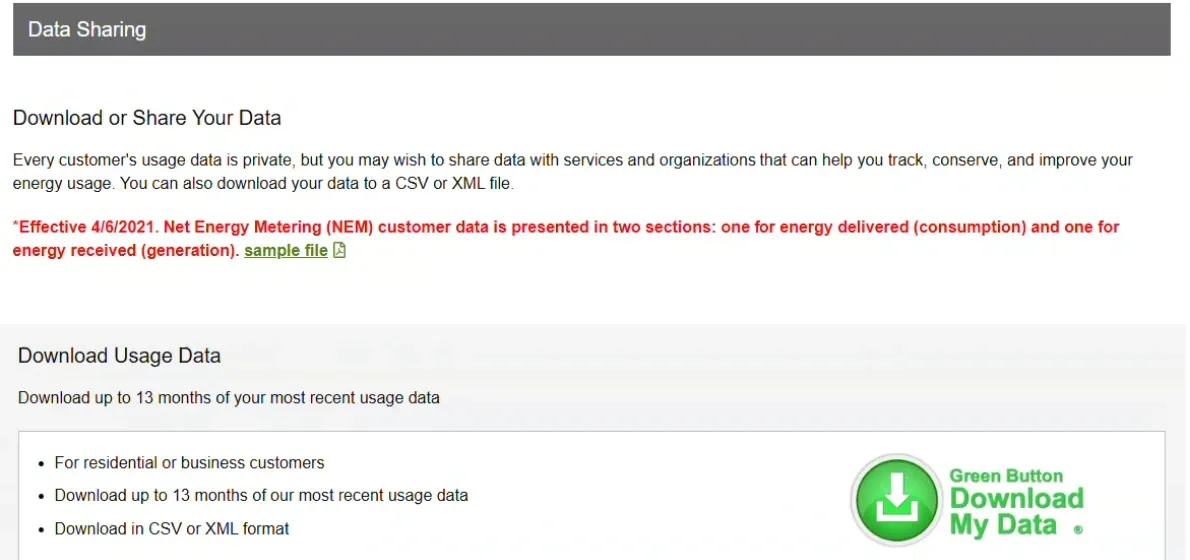
Start the download
Under Download Usage Data, click Download.
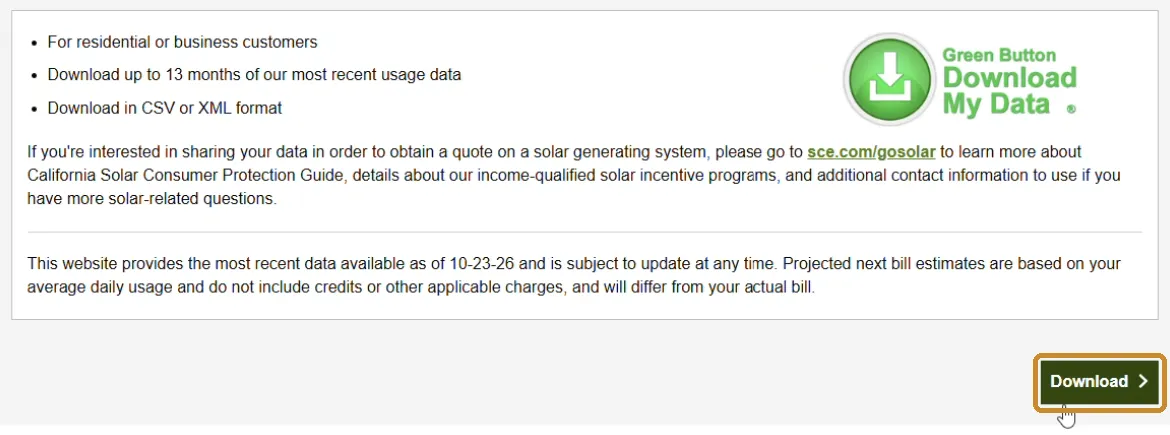
Pick the dates
Set To to today and From to the same day last year. SCE allows up to 13 months per download. Grey dates in the calendar aren’t available yet.
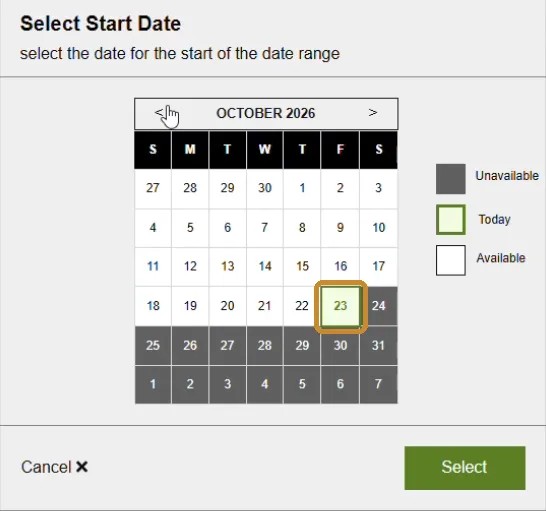
Download the file
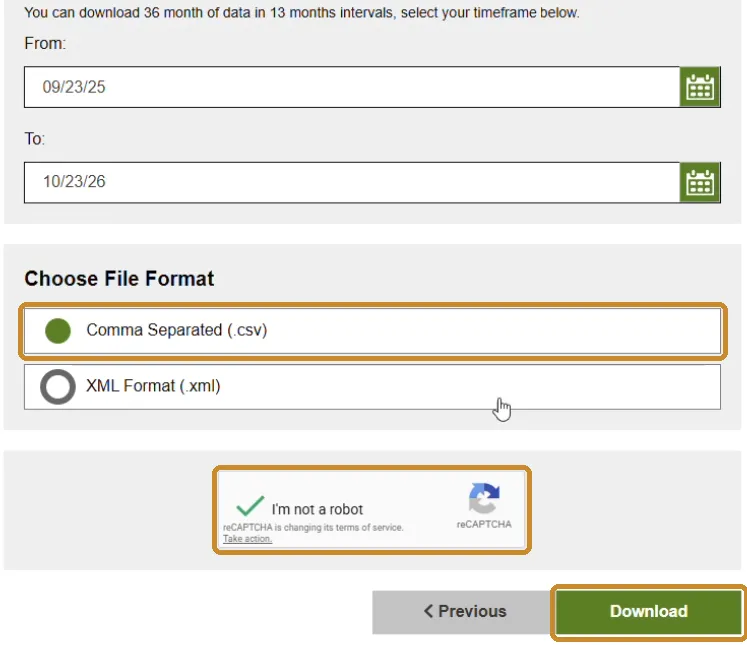
Leave Comma Separated (.csv) selected, tick I’m not a robot, then click Download. The file can take a minute to arrive.
Part 2
Download your bills
The bills tell us your rate and every charge on it, so the savings estimate matches what you actually pay.
Download your last 12 bills
Back on the My Account dashboard, find the Billing & Payment Options card and choose Billing & Payment History. Download the PDF of each of your last 12 bills. Several accounts under one login? Click More on the account first.
SCE keeps up to 36 months of bills on this page.
Send it to us
Email the files to us, or reply to your EQORE contact with them attached. If the attachments are too large, a shared folder link works too.
- Interval CSV covering 12 to 24 months, one per meter
- The last 12 bill PDFs, for each meter
What “interval data” means, in plain English
Interval data is your electric meter’s reading every 15 minutes: a log of how much power your building used, and when.
Your utility already records it. Getting a copy takes your utility login, a signed form or a read-only sharing link, depending on the utility.
Why we ask for it as well as your bills
On most commercial rates, the demand charge is set by your single highest 15-minute average in the billing period. A bill shows that one number. The interval data shows every 15 minutes of the year: when the peaks happen, how long they last and how often they come back.
That is what sizes a battery. A short spike needs power for a few minutes; a two-hour plateau needs energy. Bills alone can't tell the two apart, so we ask for both.
Guides for other utilities
SCE data questions
What is interval data, and why do you need it?
Interval data is your electric meter’s reading every 15 minutes: a log of how much power your building used, and when. Your bill shows only the monthly totals and the single highest 15 minutes, which sets your demand charge. The interval data shows when those peaks happen and how long they last, and that is what decides how big a battery you need and what it can save.
Can I just send PDFs of 12 months of bills instead?
Bills are a good start, and we can give you a rough first read from them alone: your rate, your monthly usage and the peak behind each demand charge. What bills can’t show is when that peak happened, how long it lasted or how often the building came close. That is what sizes a battery and sets the savings, so for a proposal we need the interval data too.
How far back can I download SCE interval data?
Up to 13 months in one download, and up to 36 months in total. For two years, run the download twice with back-to-back date ranges and send both files.
Should I pick CSV or XML?
Either works. CSV is SCE’s default and opens in Excel, so leave it selected unless your EQORE contact asks for XML.
I have solar. Does the file look different?
Yes. For Net Energy Metering customers, SCE splits the file into two sections: energy delivered to you and energy you sent back to the grid. Send the file as it is; we need both.
I have several meters or accounts. Does that matter?
Only in that we need the data for each one: one interval file and 12 bills for each service account. Repeat steps 2 to 6 for each account and name the files so we can tell them apart.
I don’t have an SCE login. How do I get one?
Register at sce.com/user-registration with the account number from your bill, your name, an email address and a password. SCE then sends a 6-digit verification code. If you still don’t see Data Sharing & Download, email info@eqore.com or call (857) 524-2670 and we’ll walk through it with you.
Sources (2)· Last reviewed October 26, 2026
Take control of your power
Find out what your facility could save
If you spend more than $10K a month on electricity, it’s worth a call. Send the files and we'll come back with system options, projected savings and payback. Free, no obligation.