How to get your electric data from PG&E
Interval data is your electric meter’s reading every 15 minutes: a log of how much power your building used, and when. Here’s how to download it, and your last 12 bills, from your PG&E business account in about ten minutes.
What we need
Two things from your PG&E account, for each meter.
- Interval data
- One CSV file covering the last 12 to 24 months.
- Monthly bills
- The last 12 bills, saved as one PDF each.
- Before you start
- Your login for myaccount.pge.com. No login? Step 1 covers registering.
Part 1
Download your 15-minute interval data
PG&E's Usage and Rates page exports every 15-minute read for the dates you pick as a single CSV.
Sign in, or get a login
Log in at myaccount.pge.com. No login yet? Register at pge.com/register with your account number (top right of your bill), the phone number on the account and your ZIP code.
If someone else in your company manages the PG&E account, they can invite you as a full-access user instead.
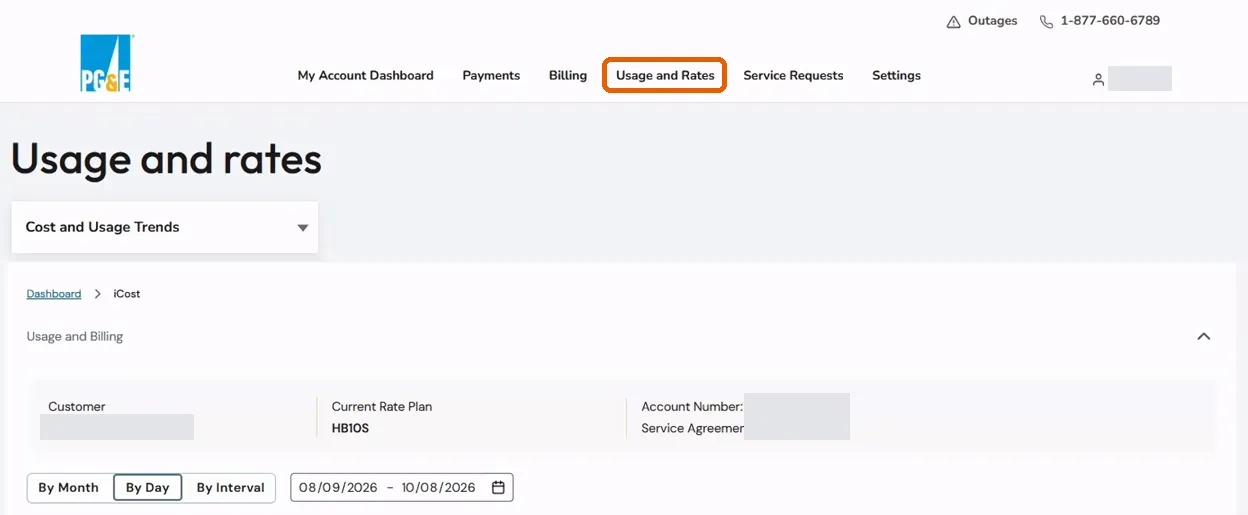
Open Usage and Rates
From the top menu, click Usage and Rates. You land on the Cost and Usage Trends view.
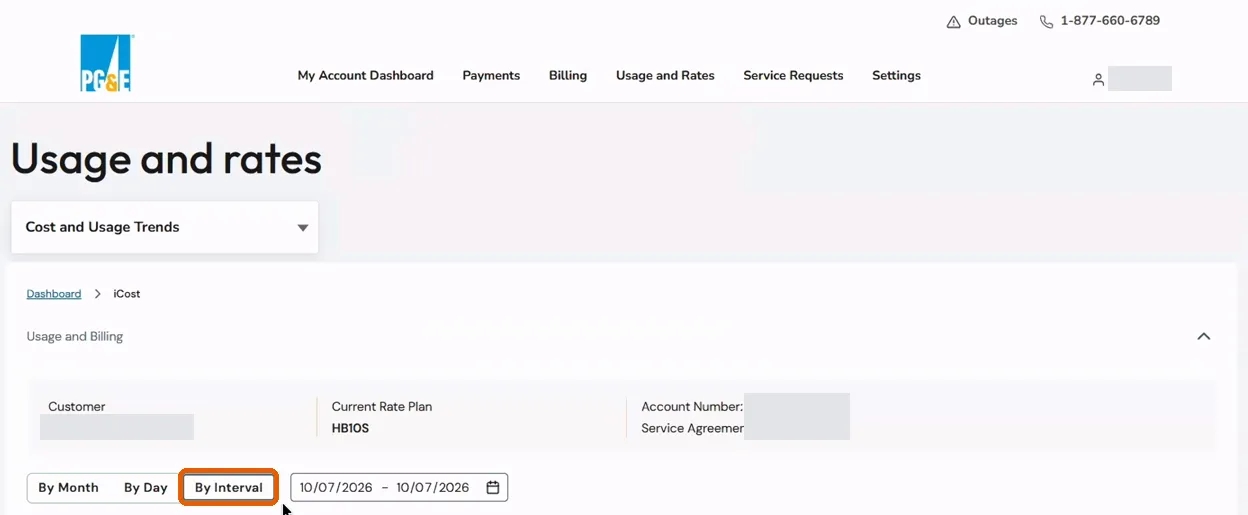
Switch the view to By Interval
Click By Interval, next to By Month and By Day.
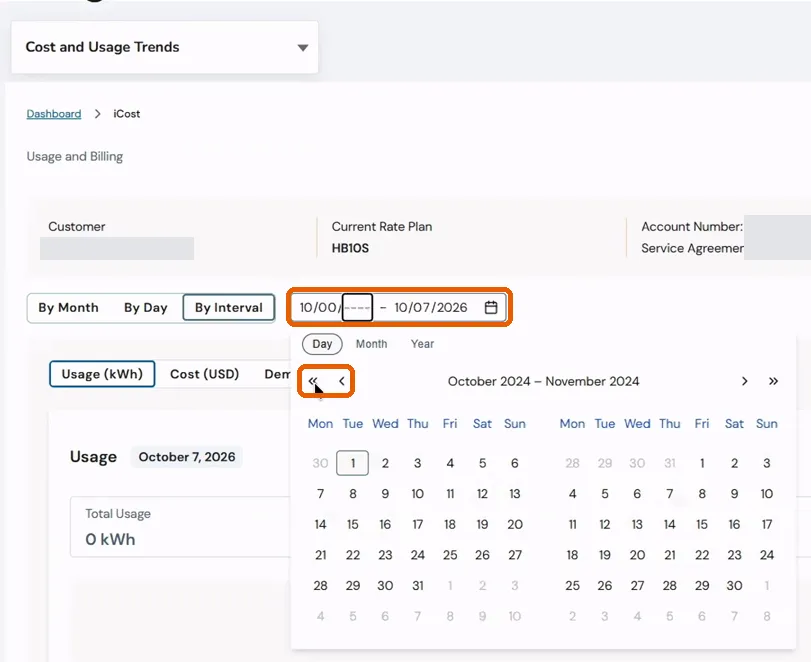
Set the date range
Click the calendar icon. Use the « and ‹ arrows to go back, click your start date, then your end date. Aim for 12 to 24 months.
If clicking doesn’t take, type the dates into the field as MM/DD/YYYY.
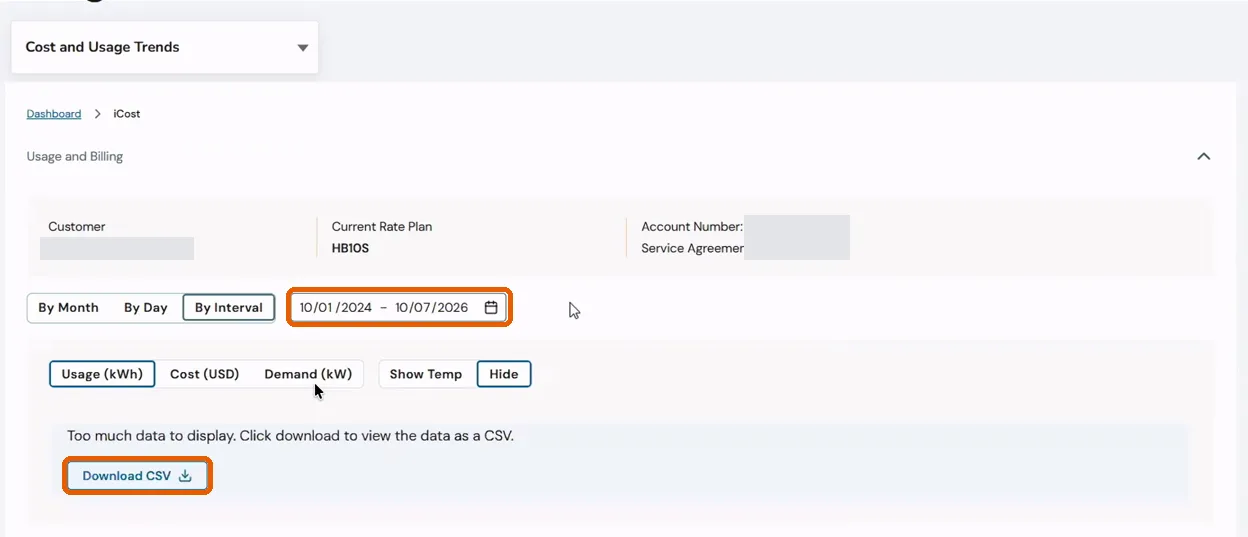
Click Download CSV
PG&E will say there is too much data to display. That’s expected: click Download CSV and the file still contains everything.
Find the file and check it
The file saves as interval-data.csv, about 3 MB for two years. Its columns are Date / Time, Usage (kWh), Cost (USD), Energy Price and Demand (kW).
The most recent day or two may show zeros because of a posting delay. Send the file as it is.
Part 2
Download your monthly bills
The bills tell us your rate and every charge on it, so the savings estimate matches what you actually pay.
Open Billing & Payment History
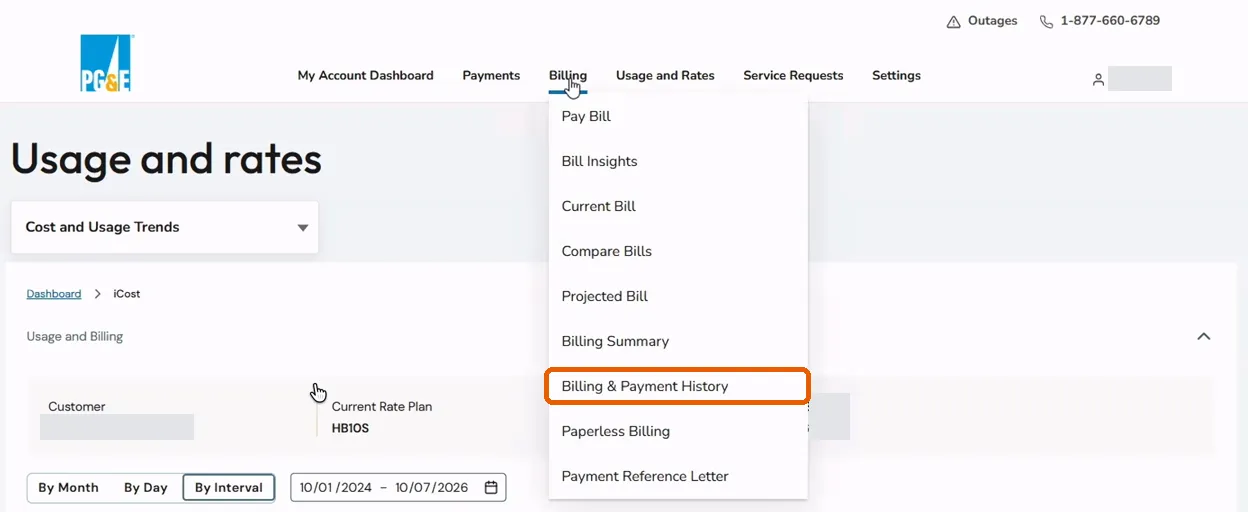
Hover over Billing in the top menu and click Billing & Payment History.
Download each bill PDF
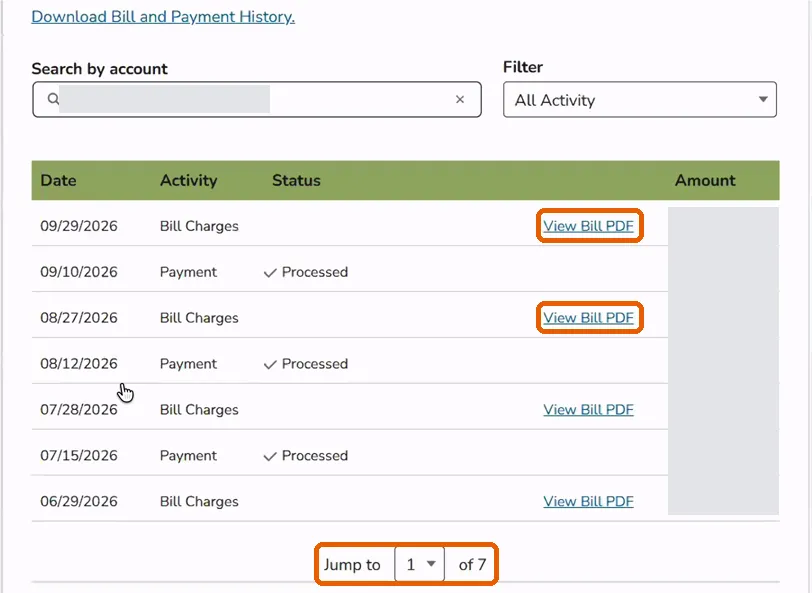
Your account fills in automatically. Leave the filter on All Activity. Click View Bill PDF on each Bill Charges row for the last 12 bills. Use the Jump to dropdown at the bottom to reach older bills.
Optional: the billing summary
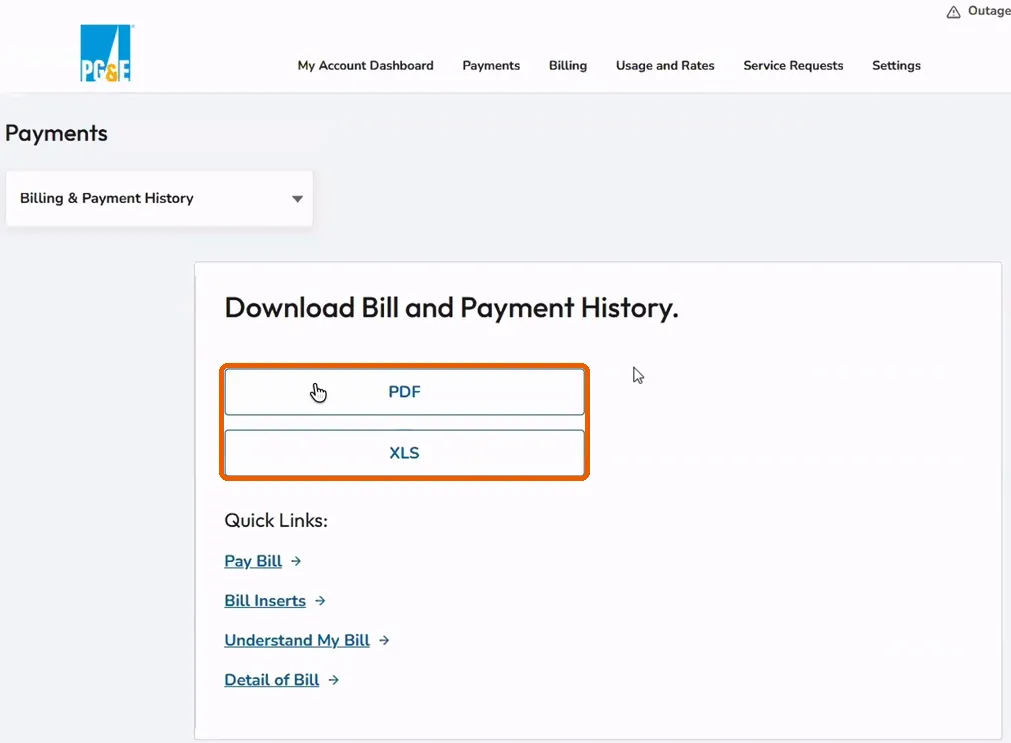
Download Bill and Payment History at the top of the same page gives a 24-month summary as PDF or XLS. It shows totals only, so it doesn’t replace the bill PDFs.
Send it to us
Email the files to us, or reply to your EQORE contact with them attached. If the attachments are too large, a shared folder link works too.
- Interval CSV covering 12 to 24 months, one per meter
- The last 12 bill PDFs, for each meter
- Optional: the 24-month billing summary
What “interval data” means, in plain English
Interval data is your electric meter’s reading every 15 minutes: a log of how much power your building used, and when.
Your utility already records it. Getting a copy takes your utility login, a signed form or a read-only sharing link, depending on the utility.
Why we ask for it as well as your bills
On most commercial rates, the demand charge is set by your single highest 15-minute average in the billing period. A bill shows that one number. The interval data shows every 15 minutes of the year: when the peaks happen, how long they last and how often they come back.
That is what sizes a battery. A short spike needs power for a few minutes; a two-hour plateau needs energy. Bills alone can't tell the two apart, so we ask for both.
Guides for other utilities
PG&E data questions
What is interval data, and why do you need it?
Interval data is your electric meter’s reading every 15 minutes: a log of how much power your building used, and when. Your bill shows only the monthly totals and the single highest 15 minutes, which sets your demand charge. The interval data shows when those peaks happen and how long they last, and that is what decides how big a battery you need and what it can save.
Can I just send PDFs of 12 months of bills instead?
Bills are a good start, and we can give you a rough first read from them alone: your rate, your monthly usage and the peak behind each demand charge. What bills can’t show is when that peak happened, how long it lasted or how often the building came close. That is what sizes a battery and sets the savings, so for a proposal we need the interval data too.
PG&E says there is too much data to display. Did something go wrong?
No. The By Interval chart only draws short ranges, but the Download CSV button still exports the whole range you picked. Two years downloads as one file.
Why are the last few rows zeros?
PG&E posts meter reads with a delay of a day or two, so the newest intervals can show zero. Send the file as it is.
How much data should I download?
Twelve months at minimum and 24 if you have it. A second year shows us whether last year’s peaks were typical.
I have several meters or accounts. Does that matter?
Only in that we need the data for each one: one interval file and 12 bills for each meter. Repeat Parts 1 and 2 for each one and name the files so we can tell them apart.
Does the CSV include our name or account number?
No. The file holds timestamps, usage, cost, energy price and demand. The bills carry the account details we need to match your rate.
I don’t have a PG&E login. How do I get one?
Register at pge.com/register. You need the account number from the top right of your bill, the phone number on the account and your ZIP code. If a colleague already manages the account online, they can invite you with full access instead. Stuck? Email info@eqore.com or call (857) 524-2670.
On the B-19 rate? Explore PG&E B-19 demand charges and compare example bills.
Sources (1)· Last reviewed October 26, 2026
Take control of your power
Find out what your facility could save
If you spend more than $10K a month on electricity, it’s worth a call. Send the files and we'll come back with system options, projected savings and payback. Free, no obligation.